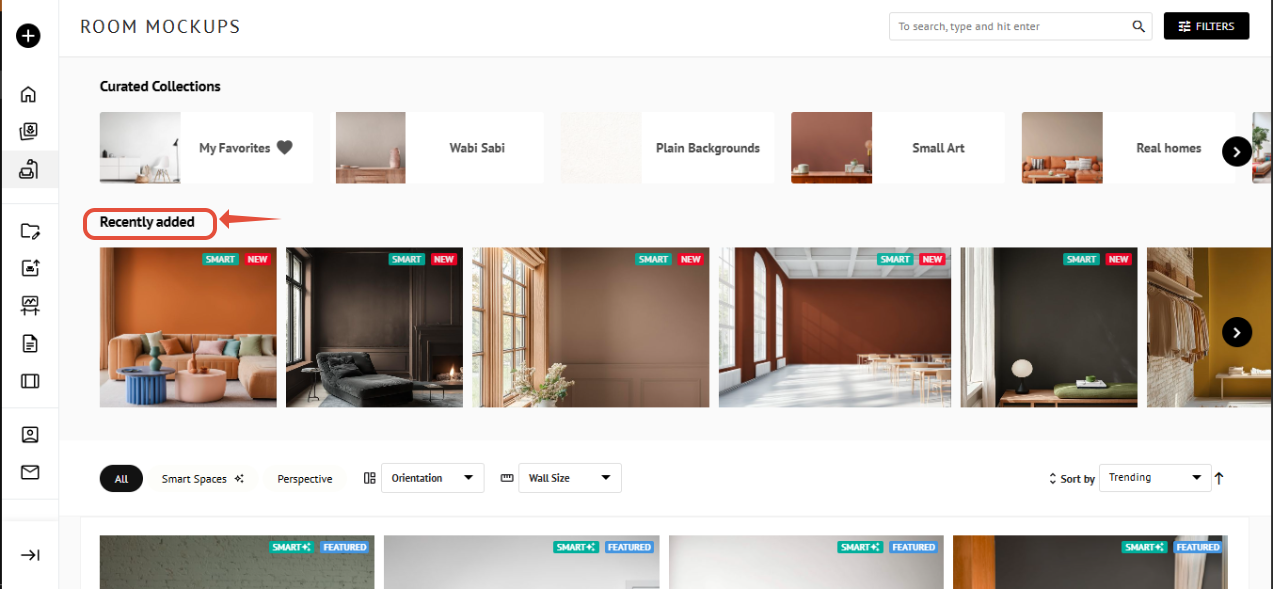
Smart Spaces are a special category of Room Mockups that allow you to layer your Artwork behind objects and customize the color of the walls.
To locate Smart Spaces, access the Room Mockup section and select Smart Spaces from the dropdown in the filter panel.
You can also identify these spaces by the “Smart” green label on the Room Mockup thumbnail.
Smart 7
We’re excited to introduce Smart 7, featuring seven fresh, curated spaces every week.
These Smart Spaces are designed to keep your presentations feeling current and dynamic, giving you a constantly updated selection to showcase your artwork in inspiring, realistic environments. Check back weekly to discover new spaces and keep your visual displays looking fresh.
You can find them by heading to the Room Mockups section, where they appear under "Recently Added".