ArtPlacer allows you to upload artworks of any shape, including round artworks and sculptures. Follow the steps below to ensure your artwork displays correctly in the platform.
1. Prepare Your Artwork
Before uploading, make sure to remove the background from your artwork. This step is very important so that irregular shapes (like circles, sculptures, or artworks that aren’t perfect rectangles) display correctly in virtual spaces.
- Use a photo editing tool or an online background remover to create a transparent background.
- Save your file as a PNG, since this format supports transparent backgrounds.
To achieve this, you can use a free online background remover.
Simply upload your Artwork image, let the tool remove the background, and then download the PNG file. The file you get there is the one you’ll need to upload to ArtPlacer.
2. Upload the Artwork with the transparent background
- Go to the Artworks section in your ArtPlacer account.
- Click Upload Artwork and select your file.
- Mark your Artwork as a “Sculpture” in the “Type of Artwork” section.
If your Artwork is a 2D Artwork, make sure to check the box labeled “This artwork has a transparent background” before finalizing the upload.
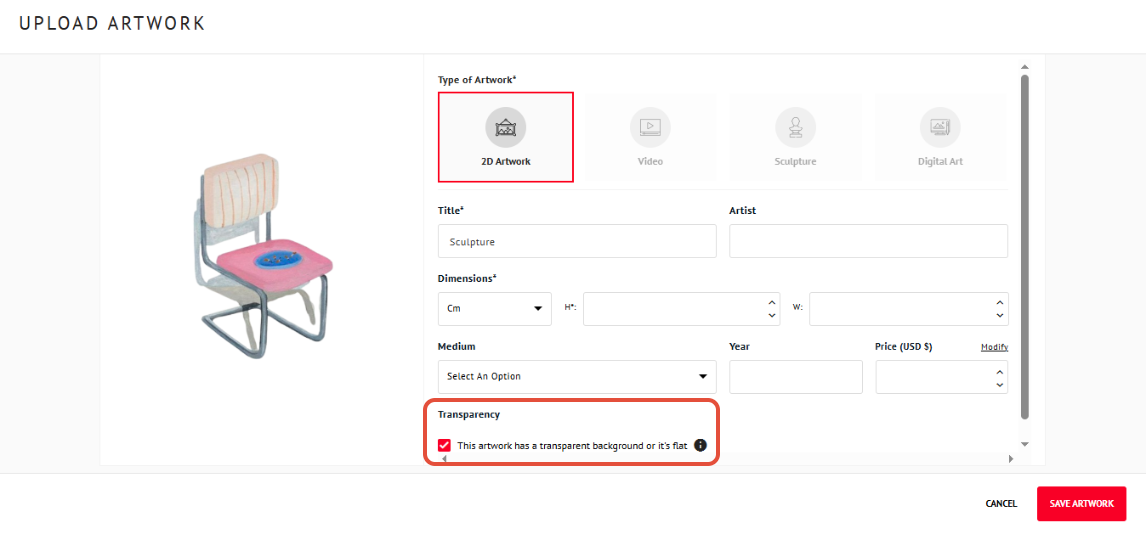
This step is important for any Artwork that isn’t a standard rectangle, including round pieces or sculptures.
3. Using Your Artwork
Once uploaded and saved:
- Your artwork is ready to be used in Room Mockups, Personal Spaces, or Virtual Exhibitions.
- Sculptures can be treated like standard artworks in the Artworks section and placed on pedestals, tables, or other surfaces in your virtual spaces.